Ads 468x60px

Showing posts with label Software. Show all posts

Monday, February 20, 2012

Internet Download Manager 6.02 Beta


Internet Download Manager 6.02 Beta
Schedule, resume and accelerate downloads by up to 5 times with this very good accelerator

Internet Download Manager (IDM) is a tool to increase download speeds by up to 500 percent, resume and schedule downloads.

Comprehensive error recovery and resume capability will restart broken or interrupted downloads due to lost connections, network problems, computer shutdowns, or unexpected power outages. Simple graphic user interface makes IDM user friendly and easy to use.

Internet Download Manager has a smart download logic accelerator that features intelligent dynamic file segmentation and safe multipart downloading technology to accelerate your downloads.

During the download process Internet Download Manager segments downloaded files dynamically, unlike other download accelerators and managers that segment files before the download starts Internet Download Manager reuses available connections without additional connect and login stages to achieve better acceleration performance.
Internet Download Manager supports proxy servers, ftp and http protocols, firewalls, redirects, cookies, directories with authorization, MP3 audio and MPEG video content processing, and a large number of directory listing formats.

IDM integrates seamlessly into Microsoft Internet Explorer, Netscape, MSN Explorer, AOL Explorer, Opera, Mozilla Firefox, Mozilla Firebird, Avant Browser, MyIE, Google Chrome, and all other popular browsers to automatically handle your downloads.

You can also drag and drop files, or use Internet Download Manager from command line. Internet Download Manager can dial your modem at the set time, download the files you want, then hang up or even shut down your computer when it's done.

Other features include multilingual support, zip preview, download categories, built-in download accelerator, scheduler pro, sounds on events, HTTPS support, queue processor, pipelining of ftp commands, html help and tutorial, enhanced virus protection on download completion, progressive downloading with quotas (useful for connections that use some kind of fair access policy or FAP like Direcway, Direct PC, Hughes, etc.), command line parameters, and many others.

Here are some key features of "Internet Download Manager":
  • All popular browsers and applications are supported! Internet Download Manager supports all versions of popular browsers, and can be integrated into any 3rd party Internet applications.
  • Download with one click. When you click on a download link in a browser, IDM will take over the download and accelerate it. IDM supports HTTP, FTP and HTTPS protocols.
  • Download Speed. Internet Download Manager can accelerate downloads by up to 5 times due to its intelligent dynamic file segmentation technology.
  • Download Resume. Internet Download Manager will resume unfinished download from the place where they left off.
  • Simple installation wizard. Quick and easy installation program will make necessary settings for you, and check your connection at the end to ensure trouble free installation of Internet Download Manager.
  • Automatic Antivirus checking. Antivirus checking makes your downloads free from viruses and trojans.
  • Advanced Browser Integration. When enabled, the feature can be used to catch any download from any application. None of download managers have this feature.
  • Built-in Scheduler. Internet Download Manager can connect to the Internet at a set time, download the files you want, disconnect, or shut down your computer when it's done.
  • IDM supports many types of proxy servers. For example, IDM works with Microsoft ISA, and FTP proxy servers.
  • IDM supports main authentication protocols: Basic, Negotiate, NTLM, and Keberos. Thus IDM can access many Internet and proxy servers using login name and password.
  • Download All feature. IDM can add all downloads linked to the current page. It's easy to download multiple files with this feature.
  • Customizable Interface. You may choose the order, and what buttons and columns appear on the main IDM window.
  • Download Categories. Internet Download Manager can be used to organize downloads automatically using defined download categories.
  • Quick Update Feature. Quick update may check for new versions of IDM and update IDM once per week.
  • Download limits. Progressive downloading with quotas feature. The feature is useful for connections that use some kind of fair access policy (or FAP) like Direcway, Direct PC, Hughes, etc.
  • Drag and Drop. You may simply drag and drop links to IDM, and drag and drop complete files out of Internet Download Manager.
  • IDM is multilingual. IDM is translated to Arabic, Bosnian, Bulgarian, Chinese, Croatian, Czech, Danish, Dutch, French, German, Hungarian, Italian, Japanese, Lithuanian, Macedonian, Polish, Portuguese, Romanian, Russian, Slovenian, Spanish, Thai languages.

Requirements:

· Microsoft Internet Explorer
· Netscape Navigator
· MSN Explorer
· AOL Explorer
· Opera
· Mozilla Firefox
· Mozilla Firebird
· Avant Browser
· MyIE
· Google Chrome

DOWNLOAD Internet Download Manager 6.02 Beta Site 1
DOWNLOAD Internet Download Manager 6.02 Beta Site 2

Friday, February 17, 2012

Portable TagScanner 5.1 Build 551


The application can rename MP3/OGG/MP files using TAG information and vice-verse


Tag Scanner is a program specialized in organizing and managing your music collection.

It can edit tags of mostly state-of-the-art audio formats, rename files based on the tag information, generate tag information from file names, and perform any transformations of the text from tags and file names.

Also you can download album details via online databases like Free DB or Amazon. It supports ID3v1, ID3v2, Verbs comments, APEv2, Windows Media and MP4(iTunes) tags. Powerful TAG editor with batch functions and special features. Play list maker with ability to export play lists to HTML or Excel. Easy-to-use interface. Built-in player.


Thursday, February 16, 2012

Windows 7 Aero Features Extended


AeroSnap, AeroGlass and AeroShake can be adjusted to be more functional, if you want to; but not from Windows. A third party tool like AquaSnap is up for the job of drawing the usability limit a bit yonder. It extends the number of windows snaps, allows you to stretch a window with a click, provides configuration settings for shake feature and can turn a window transparent to any degree you want.

Microsoft made a progress leap with Windows 7 and behind all the glitter and spark there is actually an improved desktop experience. However, as it happens with all things, better solutions fade in.


In this case, simple features like window snapping or shaking a window to get a view at the desktop, which few thought that could be improved because of their simplicity, got blown into new functionality. Preme is one example of how third party tools can add a huge contribution to overall desktop experience in Windows 7.

AquaSnap can be installed on your system just like any other application, or you can use the portable edition which requires only unzipping to a folder of your choice and running the executable (both x86 and x64 are available).

The application has no application window and as soon as it is launched it’ll take its place in the system tray. From there you can open up the settings panel and start configuring it. Advanced window snapping options also include the corners of your screen in the game, thus doubling the default options available in Windows 7.

All the windows dragged to the side edges of the screen or the top and bottom ones will be resized to occupy half the desktop area, either horizontally or vertically. Dragging them to the corners will result in a window resized to a quarter of your desktop screen.

Actually, if take a look at the tips in the application you will notice how the windows will be resized. A small thumbnail preview image of how the dragged application window will be fit on the screen is also available the moment you hit the edge during the drag.

One important aspect that needs to be mentioned is that you can change the place where the application should be resized. For instance, drag it to the top right corner and make it snap to the bottom left one. This is part of the customization options available in the program.

Under AquaStretch tab there are options for actions similar to what AquaSnap shelters. The difference consists in the fact that in this case resizing the application windows is done by clicking on their title bar border. The direction of the resize, as well as the edges that trigger it, are defined under stretching options: vertically, diagonally (the corner of the application window) or horizontally; and this can be done holding Shift key pressed or not, depending on what part of the window you want to stretch: bottom, top or both.

AquaShake mode in the program is slightly different from what window shaking does in Windows. The option in AquaSnap has the effect of making the target transparent to whatever level you desire and keep it on top of all desktop elements. More than this, you get to adjust parameters that detect the shake in terms of sensibility, speed and duration on a three-step scale going from low to high.

Activating AquaGlass mode causes all windows to become as transparent as you want when they are dragged on the screen.

One interesting part in the application is the fact that it works on Windows XP and Vista as well and it also mimics the exact same actions of the features in Windows 7. Thus you can benefit from the functionality of Aero in operating systems that do not natively support it.

Each of the aero modes proposed by AquaSnap can be disabled individually if you want to partially rely on what Windows 7 has to offer. Tinkering with the application and testing how its AeroShake feature works showed that there still are some problems with the feature coping with tabbed interfaces.

We experienced some serious issues during our every try when we shook Pidgin to clear the desktop of all the elements. At one point after some shaking the tabbed interface would no longer show all the elements. On a different system it would remain transparent until some more shaking occurred. However, trying to reproduce this with a different tabbed interface showed no anomaly.

The Good

Tweaking the aero options provided by the application is and easy job. All the information you need on the settings is accessible to any sort of user.

The portable version of the application requires no installation and the benefits of Windows 7 Aero are extended to Microsoft OSs that do not natively support them.

You are in control of the transparency level of the windows or how they expand when dragged to the desktop edges.

The Bad

Despite our trouble with shaking Pidgin’s tabbed interface, this can be considered an isolated case since we could not repeat it with other programs sporting tabs.

Shake mode is not as seamless an effect as in Windows 7 and caused some windows to stay on top although only AeroShake mode was enabled.

In Windows 7, you will no longer be able to drag by the title bar of an application when it is in full screen in order to bring it to its original size or snap it half screen if AquaSnap is enabled.

The Truth

Overall, AquaSnap does a fine job, and comes in extremely handy, especially if you are not using it on Windows 7. Having such a rich set of options AquaSnap manages to supersede what Windows 7 brings by default.

AeroShake is a bit unstable and prone to giving you unpleasant surprises, but the rest of the features worked fine during our tests.
Download1 Windows 7 Aero Features Extended

Download2 Windows 7 Aero Features Extended

10 Understandings to Purchase Windows 7


You differentiated us to have Windows softer to use, more responsive, and full of new possibilities. We listened—and successful loads of improvements. Here's our top 10:

1. Windows Seven A best desktop. 
Windows 7 gets you round your PC faster than ever. The taskbar has bigger buttons and full-sized previews—and you can pin programs to it for one-click access. Jump Lists allow shortcuts to files, folders, and websites. And Grab, Peek, and Sway give you easy (and fun) new ways to juggle all those open windows.


Tuesday, January 31, 2012

Speed Up Firefox

Everyone wants web sites and web pages to load faster, there actually isn’t anything more time consuming then waiting for a web site to load up, it really comes down to three main factors, your web browser, your internet connection and the server the website your trying to load. Apparently if you’ve got a crappy web browser, then it’s going to take longer to load then say you were using Firefox, if you have a better internet connection, then you’ll be able to load websites better and if the website is hosted on a decent server, it’ll load smarter.


Thursday, January 5, 2012

Download NCIS Episodes

If you are looking for a website where you can free download NCIS episodes, other TV Shows, movies, games, and mp3s, then this fantastic website is for you and it is very easy to use website.

Here, you can download its each and every episode of NCIS, even the current ones. This site is for guys who have missed the episodes of NCIS or who want to know what will happen in the next episode. To watch the things before they telecast, download NCIS here.

Tuesday, January 3, 2012

VLC media player 1.2.0

Video Lan
VLC - the cross-platform media player and streaming server

VLC media player is a highly portable multimedia player that supports various audio and video formats (MPEG-4, MPEG-2, MPEG-1, DivX, mp3, ogg, ...) as well as DVDs, VCDs, and various streaming protocols. It can also be used as a server to stream in unicast or multicast in IPv4 or IPv6 on a high-bandwidth network.

The stream can be MPEG 2 TS in UDP or HTTP packets unicasted or multicasted on an IPv4 or IPv6 network.

With VLC, there is no need to continually update many different codec packs. VLC comes with nearly every codec built in!

Download Adobe Flash Player New

adobe
Adobe Flash Player is a client runtime that delivers high-quality content to your computer, being capable of working with virtually all browsers out there.

Flash Player remains a key element of the Internet and has now evolved to conquer every operating system, every browser, and every portable device, including mobile phones and tablets.

And truth is, Adobe's developers did everything right, so it's absolutely no problem to install and use it on your computer.

Monday, January 2, 2012

Internet Explorer 9 For Windows 7


Internet Explorer 


Internet Explorer 9 is the new edition of Microsoft's hugely popular web browser. Building on the success of previous editions of IE with new features and a new look, Microsoft has high hopes for Internet Explorer 9.

The first thing you'll notice about Internet Explorer 9 is an overhauled interface. Making the most of the transparent graphical style available in Windows 7 and newer editions of Windows Vista, IE 9 looks sleek, smart and simpler than ever before. Like in Google Chrome, the Address bar and Search box have been merged to create a simpler, more seamless user experience.

Friday, December 30, 2011

Dr.WEB CureIt!


Dr. Web CureIt! is, as its name suggests, an application designed to heal your computer and clean the infected files, no matter whether we are talking about spyware or viruses.

One of the greatest things about downloading this software is that it does not need to be installed.

There are three scanning modes are available, "Express", "Complete" and "Custom", with a brief description provided in the right panel right in the main window.

"Express" mode for example will scan the boot sector of random access memory, of all disks, startup objects, disk boot root directory, the root folder of Windows, the Windows system folder, user folder of documents, folders and system folder while the user is temporary.

It is shipped as an executable file that requires only one double-click will launch that, in some cases, the only viable solution. Viruses and spyware often try to block the installation of a new antivirus and security software, so this is a big advantage.

Conversely, perhaps the worst thing about Dr. WEB CureIt! is its interface. It's boring to say the least, and the user was attacked with a double splash screen, as the software loads in the background.

During our testing, the scanning process takes time, especially when we give a complete scan of the spin mode, but this way we got to make sure that the computer is fully clean.

This application is not too heavy on computer resources, so scan the drive and work on your machine at the same time not a problem at all, although we would not recommend that until the end of the scanning process.

All in all, Dr. Web CureIt! is a type of tool that struggles to impress, but there is still much work to be done. Permanent protection is mandatory for such a device, while the interface is modern and stylish look likely to attract more users.

Sumber : freedrweb
Clik Download

Thursday, February 17, 2011

SpeedBurn Disc Maker 2.1.3


SpeedBurn Disc Maker description


Burn, rip and create wonderful DVD videos.
Preserve precious videos by burning them into DVD and share these priceless moments with friends and family with SpeedBurn Disc Maker. It is an easy and fast way to burn data or media CD/DVD and rip audio CD.


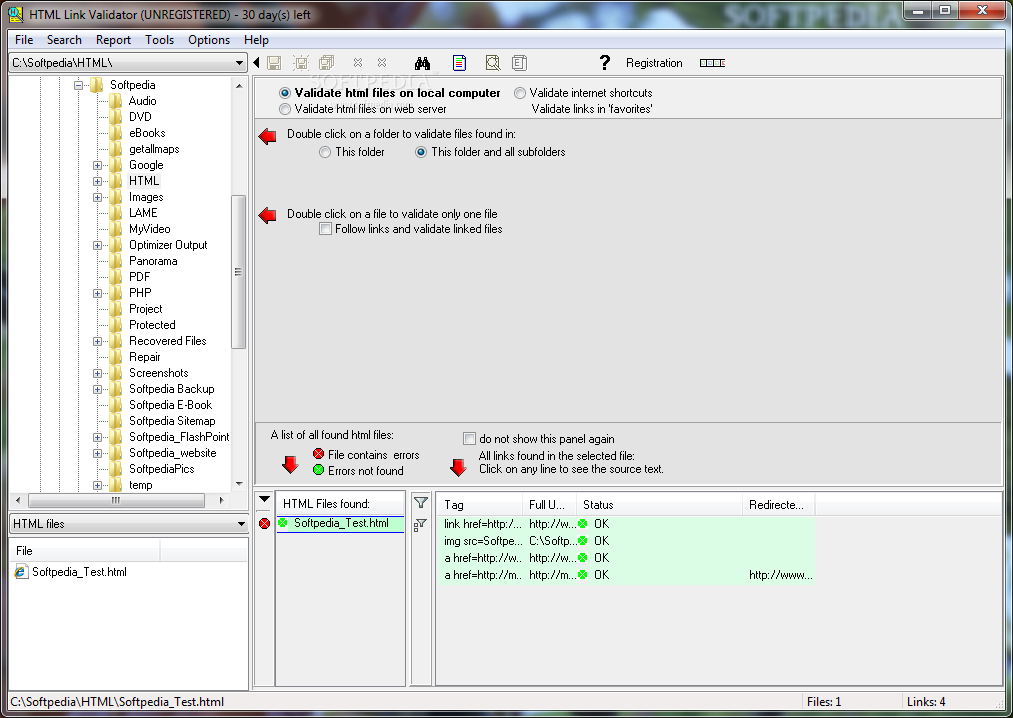
HTML Link Validator 4.52


HTML Link Validator description


Check unlimited number of pages and links
HTML Link Validator is a useful and professional tool that will check web pages for broken links, on a web server or on your local computer. Whether a novice or an experienced webmaster, you should always test your web site for broken links. There are many reasons why a link may be broken.

The file name may be typed incorrectly, or, as often happens, the resource (file) to which a link refers becomes unavailable. Case errors are also possible. For example, the link to the file "image.gif" while the real filename is "image.GIF".


Sunday, October 10, 2010

Game Hp


Game Hp

Link Silakan Unduh monggo :

Sunday, September 26, 2010

CyberLink's PowerDVD Supports Latest Blu-ray Technology, BDXL


CyberLink Corp. has announced today that one of its flagship products, namely PowerDVD, has received the PC Software Blu-ray Player certification for supporting Blu-ray Disc technology BDXL. PowerDVD is the first PC application to receive this award.

This certification was awarded by Blu-ray Disc Association (BDA), a specialized organization that creates and licenses Blu-ray Disc technology.

Furthermore, the importance of this consortium is enhanced by the fact that it is the one that establishes format standards for Blu-ray Disc.

CyberLink PowerDVD has managed to be a pioneer in supporting the latest Blu-Ray technology, BDXL, which is a multi-layer recordable format that is capable of storing up to 128 GB of data.

The CEO of CyberLink, Alice H. Chang, said: “We are excited to see the continued development of CyberLink software compatibility at the forefront of Blu-ray Disc advancements.”

“CyberLink is dedicated to providing users the best compatibility on all devices across our broad range of software applications,” she added.

Even when PowerDVD reached version 10 earlier this year, it boasted enhanced playback capabilities and longer recording playback, compared with rival applications.

Nonetheless, one will not be limited to using PowerDVD if they require BDXL support, since they can also rely on another popular CyberLink product, Power2Go.

It appears that the company is now focusing into rendering support for the latest Blu-ray Disc technology to other of its video-dedicated programs, PowerDirector, PowerProducer, and MediaShow, although this compatibility will take some time to be implemented.

Offering users a wide array of functions, PowerDVD is constantly being updated and improved, in order to meet the constantly evolving trends in technology.

Among its current features, we can mention support for Full HD and 3D Blu-ray playback, innovative media-enhancing TrueTheater technologies or lossless HD audio.

As for Power2Go, it can also be used to achieve numerous tasks, ranging from burning Blu-ray, DVDs and CDs, to protecting discs with industrial grade 256-bit encryption or creating autorun installers to display HD photos as interactive slideshows.

CyberLink PowerDVD can be be downloaded from Softpedia here.
CyberLink Power2Go can also be downloaded from Softpedia here.

Thursday, September 16, 2010

WYSIWYG Web Builder 7.2


Web Builder 6.x is a WYSIWYG (What-You-See-Is-What-You-Get)
program used to create web pages. WYSIWYG means that the
finished page will display exactly the way it was designed.
The program generates HTML (HyperText Markup Language) tags
while you point and click on desired functions you can
create a web page without learning HTML. Just drag and drop
objects to the page position them 'anywhere' you want and
when you're finished publish it to your web server (using
the build in Publish tool). Web Builder gives you full
control over the content and layout of your web page.


I N S T A L L

1) Unpack and install.
2) Overwrite existing with cracked files.
3) Enjoy this release

Download Site1

Download Site2

Avira AntiVir Premium 10.0.0.601


Avira AntiVir Premium reliably protects you against all threats from viruses, worms, trojans, rootkits, phishings, adware, spyware, bots, and dangerous drive-by downloads. Best detection rates and top-class security with several updates every day.

Advanced protection: Includes basic antivirus protection PLUS: email protection (POP3) , AntiPhishing, AntiSpyware, AntiAdware and more.

With real-time on-access scanning, profile-based on-demand scans and scheduling of full system scanning and updates it offers premium protection. It includes a POP3 based MailScanner that scans emails before they are stored on your machine. With a user-friendly control center, quarantine management, fast performance and world leading detection rates the Avira AntiVir Premium provides essential protection for your PC.

Features:

Premium Protection:
* AntiVir
* AntiAd/Spyware
* AntiPhishing
* AntiRootkit
* AntiDrive-by
* AntiBot
* EmailScanner
* WebGuard
* RescueSystem

Premium functions:
* Protection against viruses, worms and Trojans
* Protection against expensive dialers
* Detects and deletes rootkits
* NEW: Raised scan speed
* NEW: Redesigned visual appearance
* Protection against phishing
* Protection against spyware
* Special protection against email viruses (POP 3)
* Fast updates through Premium Server
* 5 Euro donation to Auerbach Foundation
* Protection against annoying adware
* NEW: System to create a Rescue-CD

Operating systems:
- Microsoft Windows 2000, SP 4
- Microsoft Windows XP Home or Professional, SP2
- Microsoft Windows Vista (32 or 64 Bit)
- Microsoft Windows 7 (32 or 64 Bit)

Download site1

Download site2

Sunday, August 8, 2010

Google Chrome 6.0.472.22 Dev Available, Get Ready for the Beta


Google Chrome 6.0.472.22 for Windows is available for download here.
Google Chrome 6.0.472.22 for Linux is available for download here.
Google Chrome 6.0.472.22 for Mac is available for download here.

A new developer release of Google Chrome 6.0 is now available for download, with the next version of the open source browser on the verge to graduating to Beta. For the time being, early adopters can download Chrome Build 6.0.472.22 and test the release on Windows, Mac OS X and Linux. Google has been paving the way for the first
Chrome 6.0 Beta for quite some time now, with the first 6.0.472.xx build being delivered in the second half of July 2010, followed by two others the past month.

With Google Chrome 6.0.472.22 Dev, the Mountain View-based search giant is delivering only minor updates, as it has done with previous 6.0.472.xx Builds. Essentially, Google is doing nothing more than softening the rough edges of Chrome 6.0 in order to get it at the quality standard that would recommend it for the Beta release. The latest release delivers updates to the browser’s user interface, as well as bug fixes affecting stability and SSL connections through HTTP proxies.

Of course, the Mountain View-based search giant hasn’t provided a release deadline for Chrome 6.0 Beta, but the extensive preparations already done point out to the proximity of the next development milestone for the browser version. After all, Google did promise recently to accelerate dramatically the release process for Chrome, noting that versions 6.0, 7.0, 8.0, 9.0, etc. will succeed one another rapidly.

Early adopters that want to stay ahead of all other Chrome testers, might consider taking the Canary Builds of Google Chrome out for a spin instead of waiting for the next Dev release. The best thing about Google Chrome Canary is that it can be installed and run alongside any Stable, Beta or Dev flavor of the open source browser.

Firefox New Download a Taste


Firefox New for Windows is available for download here.

Firefox New for Mac OS X is available for download here.

Firefox New for Linux is available for download here.

Just a taste of Firefox New is all that users will be getting this week. The Candidates for the third Beta development milestone of Firefox New are now available for download from Mozilla’s FTP servers. However, the releases offered by Mozilla are nothing more than nightly Builds, and not the actual Firefox New, namely early previews which need more testing ahead of the official release. And of course, as some


of you might have guessed, the release of Firefox New has been delayed slightly.


Windows 7 Multilingual User Interface (MUI) Packs and Language Interface Packs (LIPs)


SOURCE
Windows 7 RTM Enterprise 90-Day Evaluation is available for download here.

Microsoft has centralized all downloads of language resources for Windows 7 and Windows Vista on a single webpage, simplifying access for end users. Essentially, the Redmond company has put together a centralized hub for downloading additional languages for the successors of Windows XP. Both Multilingual User Interface (MUI) Packs and Language Interface Packs (LIPs) are featured on the “Download languages for Windows” page, along with the necessary links, and additional information for end users.

“You can download and install additional languages to view Windows menus, dialog boxes, and other user interface items in your preferred language. Additional languages will work only with a genuine copy of Windows. Some languages are installed from the Microsoft Download Center, and some are installed using Windows Update. In addition, some languages require a premium edition of Windows or a particular parent language,” Microsoft informed.

Essentially, both MUI) Packs and LIPs are available for free, however, while the later are available for all editions of Windows, the first can only be leveraged by customers with the Ultimate and Enterprise SKUs. In fact, running a MUI Pack in any other SKU of Windows 7 or Vista with the exception of the high end editions means breaking the license agreement associated with the resources.

LIPs too come with restrictions, in the sense that only users that have a specific base language for Windows will be able to access additional languages. The “Download languages for Windows” page offers details on the requirements for LIPs.

“Language Packs. If you're running the Ultimate or Enterprise edition of Windows, you can download any of the 33 available language packs by using Windows Update. Language packs provide a translated version of Windows dialog boxes, menu items, and help content,” Microsoft noted.

“Language Interface Packs (LIPs). LIPs can be installed over any edition of Windows and provide a translated version of only the most common dialog boxes, menu items, and help content. You can download LIPs from the Microsoft Download Center by using the links below. To install a LIP, you will need to have the required parent language installed on your PC. If your language is listed as "coming soon," it's on the way—check back here for updates,” the company added.

Internet Explorer 9 (IE9) New Features HTML5, CSS3, SVG, DOM IE9 Beta drops by the end of September 2010

Source
Internet Explorer 9 (IE9) Platform Preview 4 Build 1.9.7.9.16.6000 is available for download here.
The first stage of the Internet Explorer 9 (IE9) development process will come to an end next month, with Microsoft gearing up to release the first Beta build by the end of September 2010, eight weeks after the launch of Platform Preview 4. IE9 has already brought to the table a range of new features, albeit, end users haven’t really been able to enjoy any for themselves. This because the four Platform Preview releases of Internet Explorer 9 have been offered to a developer audience. As a direct consequence the new features introduced in IE9 so far are also designed mainly for developers.

It will be with the Beta milestone that the Redmond company will produce the first full IE9 browser that end users will also be able to test drive. Full browser in the sense that the release will feature the most basic elements that it currently lacks, Address Bar, Back and Forward buttons, Tabs, etc.

Still, the previews of IE9 managed to generate a lot of interest already. According to statistics shared by Microsoft over Internet Explorer 9 has already been downloaded in excess of 2.5 million times. In addition, the IE Test Drive website has attracted over 20 million visitors since its introduction in March 2010 with the launch of Platform Preview 1.

With IE9, Microsoft’s focus has been placed on bringing Internet Explorer on par with its rivals, with modern web standards support, same markup and interoperability being high on the software giant’s priorities list. It’s no wonder then that the main features already available in IE9 are related to the company’s main focus with the successor of Internet Explorer 8.

HTML5, CSS3, SVG, DOM

In the IE9 PP4 Fact Sheet, Microsoft has enumerated some of the new additions to the browser. Of course, for a more complete overview of Internet Explorer 9 developer features, Microsoft is offering the Developer Guide, with the fact sheet containing only a selection of new features.

“New HTML5 Features

- HTML5 features were first introduced in Internet Explorer 8 with support for the Document Object Model (DOM) Storage, cross-document messaging, AJAX navigation and others.
- As part of Microsoft’s commitment to HTML5 support, Internet Explorer 9 continues to add features from the HTML5 specification, and the Internet Explorer 9 Platform Previews offers the first glimpse of some of its offerings:
o HTML parsing improvements, including parsing of generic elements and overlapping tags
- Support for parsing XHTML
- Text selection APIs to enable programmatic selection of text
- Support for the